Downloads
The UNIX Tutor is a virtual machine image (=a “copy” of a virtual computer). Once downloaded, the image runs as a virtual machine inside your own PC.
The technology in use is VirtualBox. (Experienced users may use QEMU instead; see further down).
If you cannot run the tutor locally, you may want to try it out online .
Using VirtualBox
Before launching the tutor, you first need to install VirtualBox itself and import the virtual machine image. Here is an overview of the involved steps:
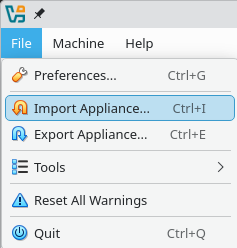
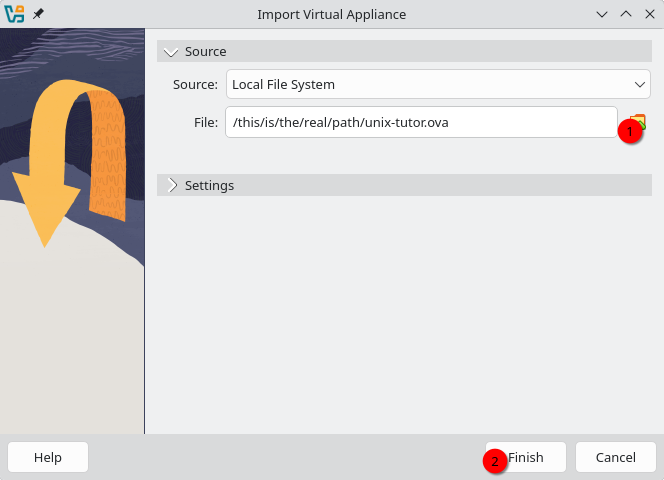
0. Download and install VirtualBox. A restart of your system may be required.1. Download the UNIX Tutor image file "unix-tutor.ova" (~2GB) from here. 2. Launch VirtualBox and import the image via File -> Import Appliance, then select (1) the downloaded file for import and click Finish (2).
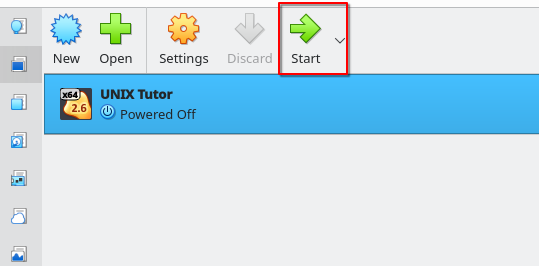
3. Wait for the import to finish, then double-click on the entry on the left or click on Start to launch the virtual machine. Done!
--
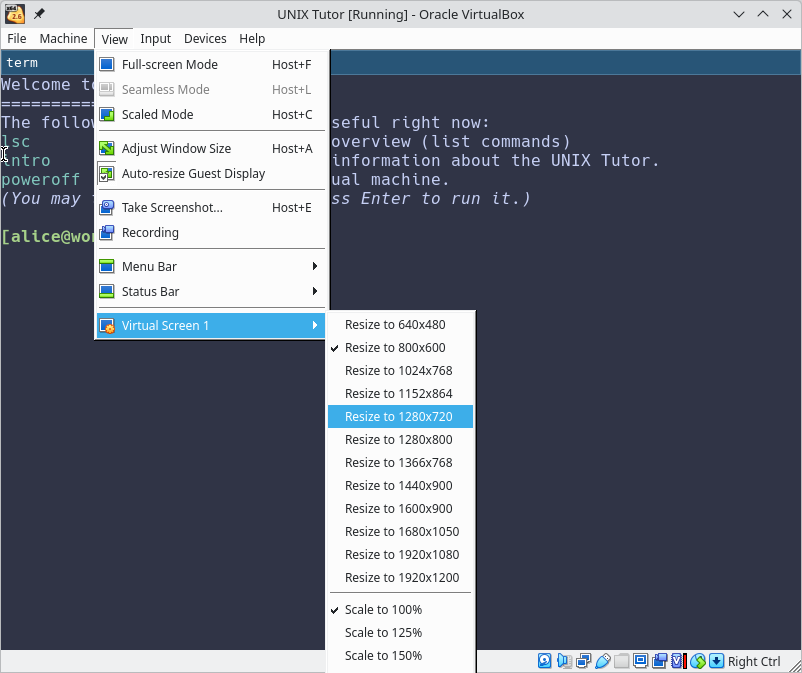
4. Optionally, if you'd like to have a larger VM window, change the size via View -> Virtual Screen 1 -> Resize to WxH. The change will be applied only after reboot (Machine -> Reset).
Using QEMU
(Not recommended for Windows users!)
0. Install QEMU.1. Download the compressed QEMU image (~2GB).
2. Decompress the file (`gzip unix-tutor.qcow2.gz`).
3. Use libvirtd/virt-manager or this simple script to launch the virtual machine.